In the rapidly evolving landscape of 2026, the bridge between design and code has shifted from a manual slog to an intelligent, automated dialogue. Using Claude Code to transform a simple screenshot into a working UI is a powerful "wow" moment, but as recent experiments reveal, there is a profound chasm between a visual approximation and a production-ready implementation.
Here is a deep analysis of the modern AI-driven development workflow, framed to guide teams from prototype to product.
The "Vibe Coding" Trap: Pixel Perception vs. Design Intent
When you provide Claude with a flat image, it performs visual reasoning. It decodes pixels, infers hex codes, and estimates layouts. This is perfect for rapid ideation or "vibe coding"—sketching out a concept in minutes. However, it operates without design intent.
1. The Fragility of Pixel-Guesswork
In a screenshot-to-code result, the CSS is often a collection of hardcoded px values and guessed colors. While it may look correct initially, it's brittle. If a designer updates a token—changing primary-500 from one blue to another—the image-based workflow requires a re-screenshot, a re-prompt, or a manual hunt through the generated code. There is no connection to the underlying design system.
2. The Figma Specs Advantage: A Single Source of Truth
Adopting a Figma-first approach—using tools like the Figma Model Context Protocol (MCP) for Claude—shifts the AI from guessing to reasoning with authority.
- Design Tokens: Instead of
color: #3b82f6, you getcolor: var(--color-primary-500). - Scale & Rhythm: Instead of
padding: 13px, you getpadding: var(--spacing-4). - Semantic Layers: The AI understands component names, variant properties, and auto-layout constraints, translating them into logical, maintainable code.
Core Insight: Image-to-code builds a snapshot. Figma-to-code builds a living system.
Real-World Experiment: Screenshot-to-Code in Action
In 2026, the bridge between design and code has shifted from manual implementation to intelligent automation. But there's a profound difference between visual approximation and production-ready code. Let's examine a real experiment that reveals this gap.
The Experiment Setup
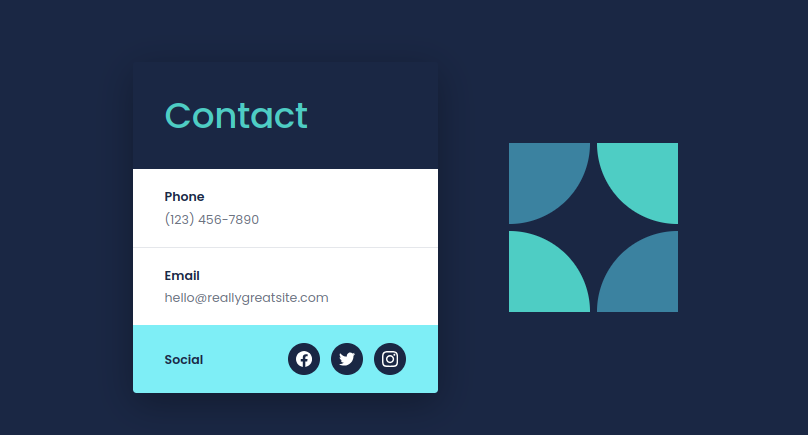
I provided Claude Code with a screenshot of a contact UI component and asked it to recreate the interface in Next.js. Here's what happened:
Original Design (Provided as Screenshot):

AI-Generated Result:
What Went Right
Claude successfully inferred:
- Overall layout structure (contact form with decorative graphic)
- Color palette (dark navy background, cyan/teal accents)
- Component hierarchy (heading, form fields, social icons)
- General spacing and proportions
- Semantic HTML structure
The AI delivered a working prototype in under 2 minutes—perfect for rapid ideation.
What Went Wrong: The "Vibe Coding" Trap
However, comparing the two reveals critical limitations of pixel-based reasoning:
1. Visual Guesswork vs. Design Intent
| Aspect | Original Design | AI Generation |
|---|---|---|
| Logo/Graphic | Curved "S" letterform with organic flow | Generic four-quarter circle pattern |
| Typography | Specific font weights and hierarchy | Approximated with system defaults |
| Colors | Exact brand hex codes | "Close enough" guessed values |
| Spacing | Token-based rhythm (8px grid) | Hardcoded pixel values |
| Responsiveness | Constraint-based layout system | Brittle fixed-width approach |
2. The Fragility of Hardcoded Values
When Claude generates code from screenshots, it produces CSS like this:
.contact-card {
  padding: 24px;  /* Why 24? It looked about right */
  color: #3dd5f3;  /* Guessed from pixels */
  gap: 18px;       /* Magic number */
}
This works visually but breaks design system integrity. If your designer updates --spacing-lg from 24px to 32px, this component won't reflect the change. There's no connection to your source of truth.
3. Missing the Design System Layer
Screenshot-to-code creates a snapshot, not a living system. It cannot access:
- Design tokens (colors, spacing, typography scales)
- Component variants (hover states, disabled states, size options)
- Auto-layout constraints (flexbox/grid logic from Figma)
- Semantic layer names and accessibility metadata
- Interactive state definitions
The Handoff Evolution: From Static to Structural
The comparison below highlights why a specs-first approach is becoming the gold standard for professional teams in 2026.
| Feature | Screenshot to Code (Visual Guesswork) | Figma Specs to Code (Structured Translation) |
|---|---|---|
| Logic | Shallow – based on visual patterns | Deep – understands components, constraints, and tokens |
| Responsiveness | Hardcoded breakpoints, often brittle | Leverages auto-layout and constraint logic; generates fluid Flex/Grid CSS |
| State Management | Missing – produces a static UI | Includes interactive states (hover, active, disabled) as defined in variants |
| Component Mapping | Creates generic "div soup" | Maps to existing React/Vue component libraries by name |
| Maintainability | Low – values are magic numbers | High – values reference a centralized design token system |
| Accessibility | Often missing ARIA labels and semantics | Can inherit layer names and role metadata from Figma |
| Design Sync | Manual, error-prone, one-way | Automated, bidirectional potential via the design system |
The Better Approach: Figma Specs with MCP
In 2026, the professional workflow uses Figma Model Context Protocol (MCP) to give Claude direct access to design specs. Instead of guessing from pixels, the AI translates design intent with precision:
.contact-card {
  padding: var(--spacing-6);          /* From design token */
  color: var(--color-primary-400);    /* Brand color reference */
  gap: var(--spacing-4);              /* System rhythm */

  /* Auto-layout translated to CSS */
  display: flex;
  flex-direction: column;
  align-items: flex-start;
}
The code now speaks the language of your design system.
Key Insights from the Experiment
| Approach | Speed | Accuracy | Maintainability | Design Sync |
|---|---|---|---|---|
| Screenshot → Code | ⚡⚡⚡ Fast (2 min) | ~70-80% visual match | ❌ Brittle hardcoded values | ❌ One-way, manual |
| Figma Specs → Code | ⚡⚡ Medium (5 min) | ✅ 95%+ precision | ✅ Token-based system | ✅ Automated sync |
Recommended Tiered Workflow for 2026
Based on this experiment, here's the strategic approach for modern development teams:
Phase 1: Ideation & Exploration
- Use screenshot-to-code for rapid brainstorming
- Perfect for stakeholder demos and quick iterations
- Embrace "vibe coding" for speed and creative exploration
Phase 2: Production Development
- Connect Claude to authoritative Figma files via MCP
- Ensures generated code aligns with design tokens
- Maps to existing component libraries by name
Phase 3: Integration & Refinement
- Developer focuses on the "last mile":
- Complex state logic and business rules
- Performance optimizations
- Deep accessibility (ARIA, focus management)
- API integration and error handling
Key Takeaways for the Modern Development Workflow
1. Context is Not Just King—It's the Blueprint
Claude is an exceptional coder, but its output is dictated by the fidelity of context you provide. A screenshot is "lossy" context—it strips away layer names, spacing intent, and component metadata. Figma specs provide "lossless" context, turning the AI into a precise translator of designer intent.
2. The "Last Mile" is Where Developers Now Thrive
AI can generate ~90% of standard UI code in seconds. The critical "last mile"—complex state logic, nuanced performance optimizations, deep accessibility (ARIA live regions, focus management), and integration with business logic—is where the developer's role has fundamentally evolved.
We are no longer primarily writers of boilerplate; we are editors, architects, and quality auditors.
3. The Developer's Evolved Role: From Writer to Architect
The experiment reveals a fundamental shift. AI can generate the majority of standard UI code in seconds. The critical last mile—where developers now truly add value—includes:
- Complex State Logic: Multi-step forms, real-time sync, optimistic updates
- Performance Optimization: Code splitting, memoization, virtual scrolling
- Deep Accessibility: Screen reader testing, keyboard navigation flows, ARIA live regions
- System Integration: Connecting UI to APIs, handling edge cases, error boundaries
- Quality Auditing: Reviewing AI outputs for security, performance, and maintainability
We're no longer primarily writers of boilerplate. We're editors, architects, and quality auditors of AI-generated systems.
The Core Lesson: Engineering Better Context Pipelines
AI can see, but it cannot know your design system unless you provide structured context. The future isn't about training AI to be a better guesser—it's about engineering better context pipelines.
2026 Insight: The most powerful tool isn't just the AI model—it's the bridge you build between your design system and your codebase.
By leveraging protocols like MCP to give AI direct access to design truth, we move beyond recreating snapshots to automating the handoff, freeing developers to solve harder, more meaningful problems.
Conclusion: Building with Intelligence, Not Just Imagination
The experiment confirms a critical lesson: AI can "see," but it cannot "know" your team's standards, tokens, or components unless you provide structured, systemic data. The future of front-end development isn't about training AI to be a better guesser; it's about engineering better context pipelines.
The most powerful tool in 2026 isn't just the AI model—it's the bridge you build between your design system and your codebase. By leveraging protocols like MCP to give AI direct access to the source of truth, we move beyond recreating the canvas to automating the handoff, freeing human talent to solve harder, more meaningful problems.
The future belongs to developers who master both worlds:
- Understand when to use screenshot-to-code (ideation) vs. specs-driven development (production)
- Build robust context pipelines between design systems and AI tools
- Focus human expertise on the complex "last mile" problems
Together, these skills redefine software creation from writing code to orchestrating intelligent systems.